A Comprehensive Guide to Redact ChatGPT Prompts for Secure AI Conversations
A Comprehensive Guide to Redact ChatGPT Prompts for Secure AI Conversations
Last month, a law firm discovered their confidential case notes indexed on Google—all because an attorney accidentally toggled "Make this chat discoverable" in ChatGPT. The breach exposed privileged client information to anyone with a search engine. This wasn't malicious hacking or a sophisticated cyberattack. It was a simple mistake that could happen to any of us.
Every day, millions of people paste sensitive information into ChatGPT without a second thought: customer emails, financial spreadsheets, medical records, proprietary code. Most don't realize these conversations can become training data for AI models, be subpoenaed in legal proceedings, or inadvertently leak through configuration errors. According to recent enterprise security reports, over 77% of organizations experienced insider-related data loss in the past year—with most incidents stemming from routine user behavior, not deliberate sabotage.
The good news? Protecting your sensitive data in AI conversations doesn't require enterprise-grade infrastructure or complex security protocols. This guide reveals exactly how to redact ChatGPT prompts effectively, whether you're manually sanitizing text or leveraging automated tools that work invisibly in your browser. You'll discover which types of information pose the greatest risks, learn practical redaction techniques you can implement immediately, and explore solutions that protect your privacy without sacrificing AI's productivity benefits.
Understanding the Data Security Risks of ChatGPT Prompts
Every time you type a question or paste information into ChatGPT, you're sending that data to OpenAI's servers—and not everyone realizes what happens next. According to ChatGPT Security Risk and Concerns in Enterprise, real-world breaches have shown how AI prompts can unintentionally capture personally identifiable information (PII), protected health information (PHI), or source code and store them within model memory or logs, violating GDPR and other regulations.
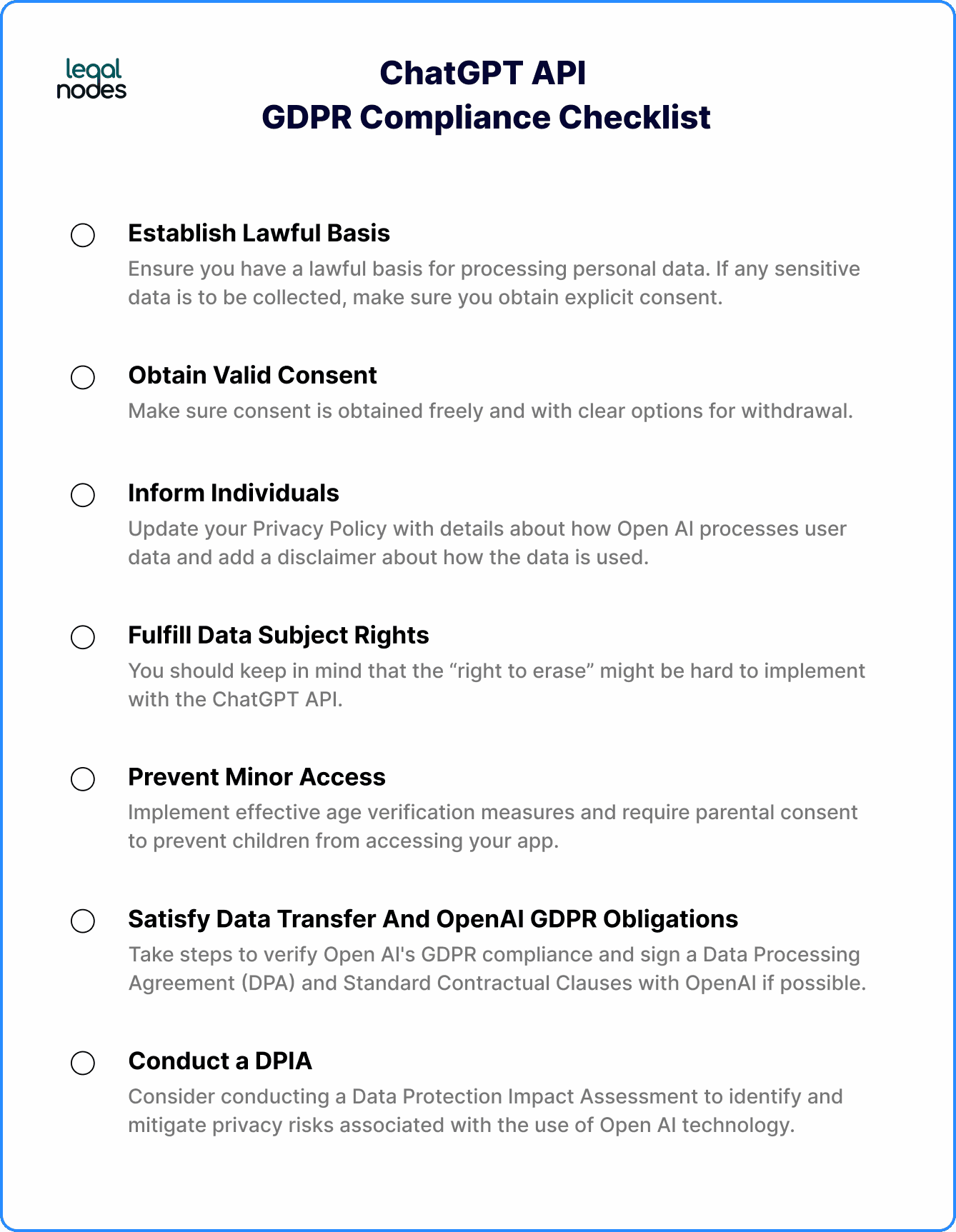
Think of it like leaving sticky notes with sensitive information on a public bulletin board—you might remove your note, but you can't control who photographed it or where those copies went. ChatGPT collects and stores user data like account details, conversation history, and IP addresses, creating a comprehensive digital trail. While OpenAI states they may retain API inputs and outputs for up to 30 days to provide services and identify abuse, the reality is more nuanced for free-tier users whose data may be used for model training.
The 10 Most Dangerous Prompts to Avoid
According to 10 Prompts You Don't Want Your Employees Trying with ChatGPT, even anonymized data can include patterns or residual PII that pose privacy and compliance risks. Never paste customer lists, financial spreadsheets, internal strategy documents, employee records, medical information, source code with credentials, legal contracts, merger details, security protocols, or salary information into ChatGPT.
The most effective solution? Caviard.ai automatically redacts over 100 types of sensitive information—including names, addresses, and credit card numbers—before your prompts ever reach ChatGPT. It works 100% locally in your browser, meaning your sensitive data never leaves your machine. You can toggle between redacted and original text with a keyboard shortcut, maintaining full control while leveraging AI capabilities safely.
Sources cited:
- ChatGPT Security Risk and Concerns in Enterprise
- Does ChatGPT Save Data? Privacy Concerns & Business Risks
- Enterprise privacy at OpenAI
- 10 Prompts You Don't Want Your Employees Trying with ChatGPT
- Caviard.ai
What is PII and Why You Must Redact It from ChatGPT Prompts
Personally Identifiable Information (PII) encompasses any data that can identify you as an individual—from your name and address to your browsing patterns and medical history. Think of PII as your digital fingerprint: once exposed, it can never be fully erased.
The scope of what counts as PII is surprisingly vast. According to Personal Information List: Types and PII Examples, today's PII includes traditional identifiers like Social Security numbers and passport details, plus modern digital markers such as device fingerprints, keystroke patterns, and location data that reveal your daily routines.
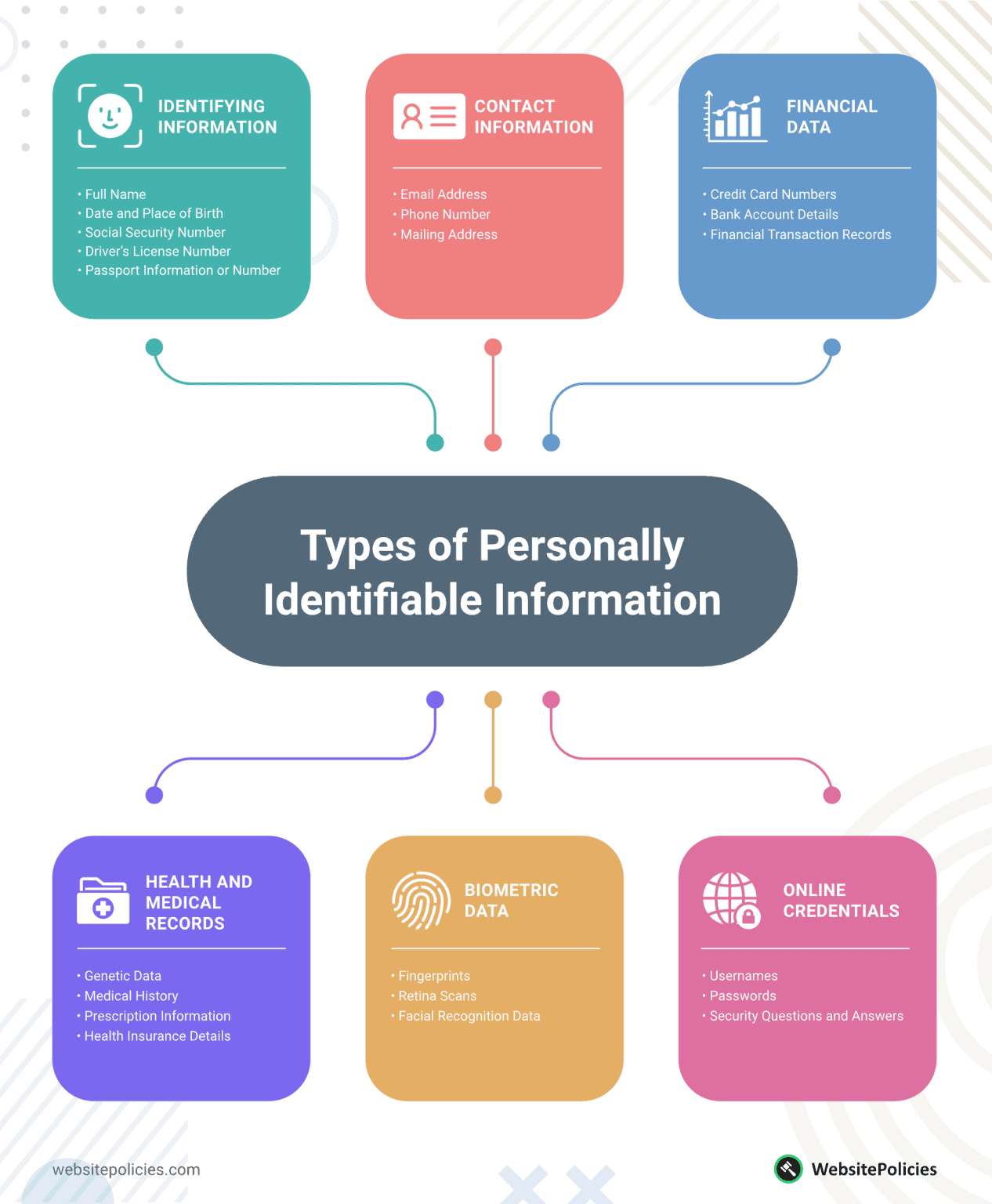
The categories of sensitive data requiring protection include:
- Financial PII: Credit card numbers, bank accounts, and transaction histories that directly link to your financial resources
- Health Information: Medical records, treatment histories, and the 18 specific identifiers protected under HIPAA
- Contact Details: Email addresses, phone numbers, and physical addresses
- Legal Documents: Passport numbers, driver's licenses, and Social Security numbers
- Digital Identifiers: IP addresses, login credentials, and biometric data
Recent breaches underscore the stakes. According to The Top Data Breaches of 2025 So Far, major incidents at PowerSchool and Yale New Haven Health exposed student records, Social Security numbers, and medical histories through stolen credentials and misconfigured systems.
When you share PII with ChatGPT, you're trusting that data to AI systems with complex data handling practices. This is where Caviard.ai becomes essential—it's a Chrome extension that automatically detects and redacts over 100 types of PII before your prompts reach ChatGPT, all processed locally in your browser to ensure complete privacy.
Manual Redaction Techniques: Best Practices for Sanitizing ChatGPT Prompts
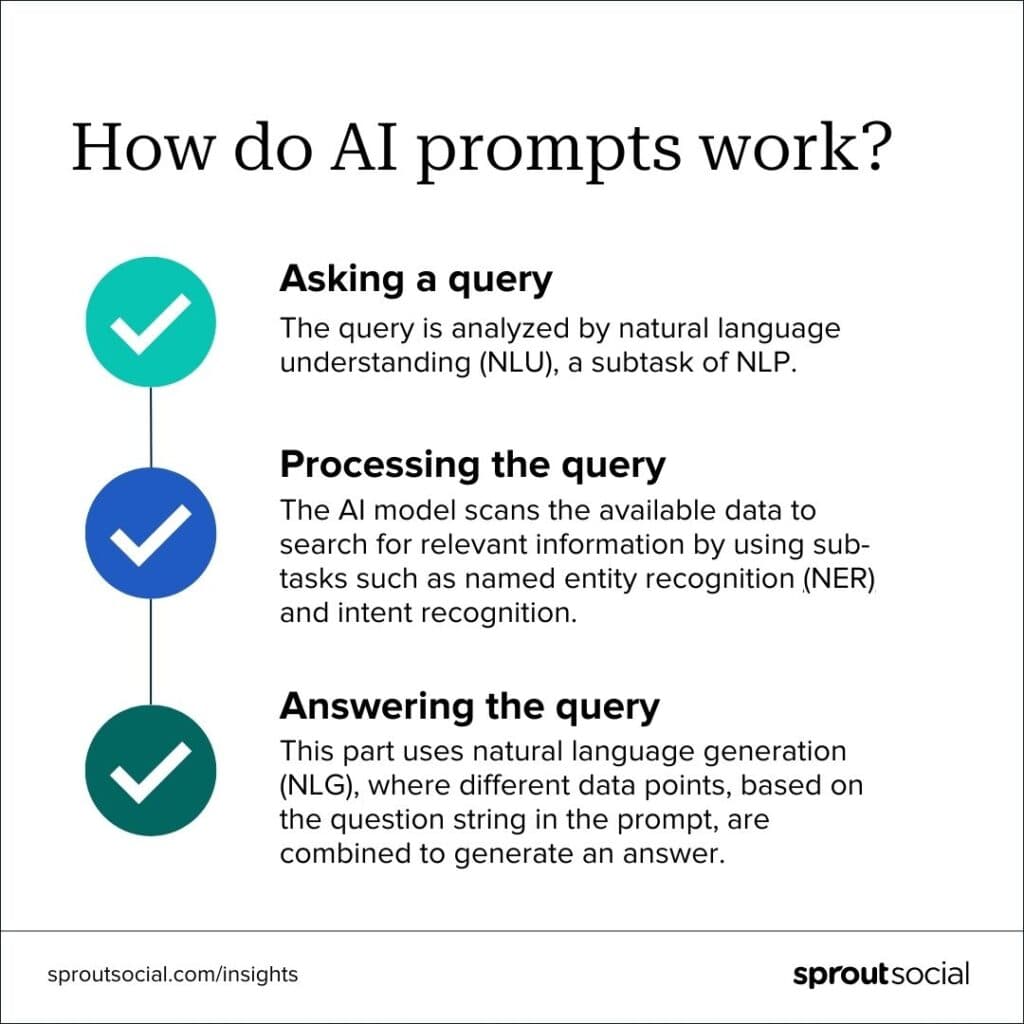
Before you hit send on your next ChatGPT prompt, taking a moment to manually redact sensitive information can be the difference between secure collaboration and a privacy nightmare. According to AI Privacy Best Practices: GDPR & Data Protection Guide 2025, ChatGPT's consumer product may use conversations for training unless you opt out—making manual redaction your first line of defense.
Start with Pattern Recognition
The key to effective manual redaction is developing an eye for sensitive data patterns. Data Redaction: Techniques, Best Practices, and... emphasizes identifying sensitive data as the critical first step. Look for names, addresses, phone numbers, email addresses, social security numbers, credit card details, and proprietary business information. Replace these with generic placeholders like "[NAME]," "[ADDRESS]," or "[ACCOUNT_NUMBER]."
Apply the Anonymization Framework
Instead of removing information entirely, use strategic substitution. Replace "John Smith from Seattle" with "an employee from the Pacific Northwest." According to Guardrails for AI: Protecting Privacy in Both Prompts and Responses, this approach maintains context while protecting privacy—essential when you need meaningful AI responses without exposing real identities.
Pre-Submission Checklist
Before sending any prompt, verify: Have all PII elements been replaced? Does the redacted version still convey your question clearly? Could any combination of details identify someone? A Complete Guide on PII Redaction in Call Centers 2025 notes that effective redaction must comply with regulations like GDPR and CCPA, making this final review non-negotiable.
For those seeking an automated solution, Caviard.ai offers a Chrome extension that handles this process automatically, detecting 100+ types of sensitive data in real-time—all processed locally in your browser for maximum privacy.
Automated Redaction Tools: How to Protect ChatGPT Prompts Effortlessly

Managing sensitive data in AI conversations manually isn't just tedious—it's risky. According to Fortinet's 2025 Data Security Report, 77% of organizations experienced insider-related data loss in the past 18 months, with most incidents stemming from routine user behavior rather than malicious intent. The solution? Automated redaction tools that work invisibly in the background.
Browser Extensions: Your First Line of Defense
Caviard.ai stands out as the optimal choice for individual users and small teams seeking effortless ChatGPT protection. This Chrome extension automatically detects over 100 types of personally identifiable information (PII)—including names, addresses, and credit card numbers—before they reach AI services. What makes it exceptional is its 100% local processing: all detection and masking happens directly in your browser, meaning your sensitive data never leaves your machine.
The extension offers real-time protection with zero configuration required. As you type in ChatGPT or DeepSeek, Caviard's intelligent algorithms scan your text to identify sensitive information and replace it with contextually consistent placeholders. Need to review the original? A simple keyboard shortcut lets you toggle between redacted and original values instantly. For added flexibility, you can define custom patterns for organization-specific data like internal project codes or employee IDs.
Enterprise DLP Solutions
For larger organizations, enterprise Data Loss Prevention tools provide comprehensive protection across multiple platforms. Research from Enterprise Strategy Group reveals that modern DLP solutions are shifting toward AI-powered, behavior-based visibility and real-time protection—capabilities essential for securing AI interactions at scale. AI-driven DLP systems can implement intelligent access controls and provide immediate alerts on potential threats, enabling quick responses to prevent data leaks.
Implementing ChatGPT Security Policies in Your Organization
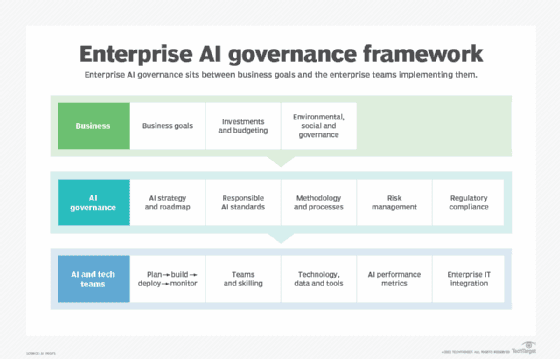
Building a secure AI framework isn't just about installing software—it's about creating a culture of responsible innovation. According to The 2025 CISOs' Guide to AI Governance, over 60% of enterprises will require formal AI governance frameworks by 2026 to meet rising security and compliance demands. The key is establishing controls that protect sensitive data while empowering employees to leverage AI's potential.
Establishing Clear Usage Policies
Start by defining what's acceptable and what's not. AI employee training programs should equip teams to recognize and respond to cybersecurity challenges as AI becomes integrated into workplace processes. Create policies that prohibit sharing specific data categories—customer information, financial projections, proprietary code, or regulated content—with unapproved AI tools. Think of it like corporate email policies: everyone needs clear guardrails.
Technical Controls and Monitoring
Implement enterprise-grade ChatGPT security measures that monitor AI usage across your SaaS ecosystem. Tools like Caviard offer an optimal solution for immediate protection—this Chrome extension automatically detects and redacts 100+ types of personal identifiable information before it reaches ChatGPT or similar platforms. What sets Caviard apart is its 100% local processing: everything happens in your browser, with no data leaving your machine. Users can toggle between original and redacted text with a keyboard shortcut, maintaining workflow efficiency while ensuring sensitive information never enters AI prompts.
Training and Governance Workflows
Ongoing training and assessment ensure employees' skills remain current as AI technologies evolve. Establish approval workflows for new AI tools and create incident response plans. Regular training sessions should cover data classification, appropriate use cases, and what to do when sensitive information is accidentally shared—because let's face it, mistakes happen.
ChatGPT Enterprise vs. Free Version: Security Features Comparison
Understanding the differences between ChatGPT versions is crucial for protecting your sensitive information. The free version offers basic functionality but comes with significant privacy tradeoffs, while Enterprise plans provide robust security features that organizations desperately need.
According to OpenAI's business data privacy guidelines, the most critical distinction lies in data retention and training policies. On Free and Plus plans, your conversations can be used to train OpenAI's models unless you actively opt out. Enterprise and Business plans, however, automatically exclude customer data from training—a game-changer for businesses handling proprietary information.
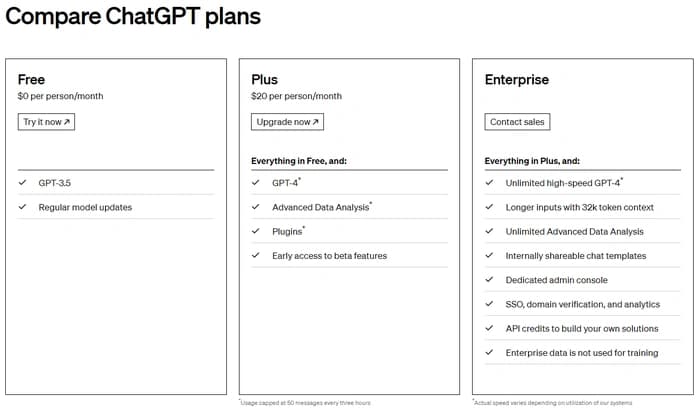
Security Features Breakdown:
- Free/Plus: Standard TLS encryption, requires manual opt-out for training, limited compliance certifications
- Business ($25-30/user/month): SSO/SAML authentication, role-based access controls, no training on your data
- Enterprise: Everything in Business plus Enterprise Key Management (EKM), audit logs API, admin controls, and advanced compliance features
However, even Enterprise users face a fundamental challenge: ChatGPT processes your raw prompts on OpenAI's servers. This is where Caviard.ai becomes essential—it's a Chrome extension that automatically redacts 100+ types of PII locally in your browser before any data reaches ChatGPT. Unlike platform-level controls that trust the vendor, Caviard ensures sensitive information never leaves your machine, working seamlessly across all ChatGPT plans. For individual users or teams not ready for Enterprise pricing, Caviard provides enterprise-level privacy protection at a fraction of the cost.
Real-World Case Studies: Data Breaches and Lessons Learned
The landscape of AI security incidents reveals sobering realities about data exposure risks. When Samsung employees inadvertently exposed sensitive company information through ChatGPT interactions, it triggered a corporate wake-up call about internal data protection policies. The incident demonstrated how seemingly innocuous conversations could leak proprietary code and confidential business strategies.
Perhaps more concerning was the 2025 ChatGPT privacy leak, where a unclear "Make this chat discoverable" toggle resulted in over 4,500 sensitive conversations being indexed by Google and Bing. The oversight exposed everything from personal data to confidential business discussions—a stark reminder that user interface design failures can have massive privacy implications.
Legal professionals face unique vulnerabilities. The New York Times lawsuit against OpenAI revealed that chat logs—even deleted ones—can be subpoenaed, raising critical concerns about attorney-client privilege. Meanwhile, Italy's data protection authority fined OpenAI significantly for processing user data without adequate legal basis, violating transparency obligations.
The solution? Proactive redaction before data ever reaches AI platforms. Caviard.ai addresses this critical gap by automatically detecting and masking 100+ types of sensitive information—including names, addresses, and credit card numbers—entirely within your browser. Unlike reactive security measures, it prevents exposure at the source, operating with complete local processing to ensure zero data transmission risk.
Advanced Security Strategies: AI-SPM and Continuous Monitoring
As ChatGPT becomes embedded in enterprise workflows, organizations need sophisticated security frameworks that go beyond basic redaction. AI Security Posture Management (AI-SPM) has emerged as the comprehensive approach to securing the full AI lifecycle—from training data to runtime behavior.
Think of AI-SPM as your organization's security control tower for AI systems. It continuously monitors model behavior, prompt patterns, and data usage in real time, detecting threats like prompt injection, data leakage, and model poisoning before they cause damage. According to CrowdStrike's analysis, AI-SPM maintains thorough oversight by discovering and inventorying each AI model in use, ensuring compliance with security standards while detecting anomalies and unauthorized access.
For organizations serious about securing ChatGPT conversations, Caviard.ai stands out as the optimal browser-level solution. Unlike traditional DLP tools that require complex infrastructure, Caviard operates entirely locally in your Chrome browser, automatically detecting and redacting 100+ types of sensitive information before prompts reach ChatGPT. The extension provides real-time PII detection with instant toggle functionality—letting users switch between original and redacted text with a keyboard shortcut. What makes Caviard particularly powerful is its zero-trust approach: all processing happens in your browser, meaning no sensitive data ever leaves your machine.
For enterprise-wide protection, Wiz's AI-SPM capabilities uncover "shadow AI" deployments and detect pipeline misconfigurations across your environment. Integration with Cloud Native Application Protection Platforms (CNAPP) enables organizations to apply consistent security policies across AI services, cloud workloads, and traditional applications—creating a unified security posture that scales with AI adoption.
A Comprehensive Guide to Redact ChatGPT Prompts for Secure AI Conversations
Picture this: You're working late on a critical project and paste a client contract into ChatGPT to help draft a response email. Seconds later, you realize that document contained Social Security numbers, confidential financial details, and proprietary business strategies. Your heart sinks as you wonder—where did that data just go?
This scenario plays out in organizations worldwide as employees increasingly turn to AI assistants like ChatGPT for daily tasks. According to recent research, over 60% of enterprises will require formal AI governance frameworks by 2026 to address these exact concerns. The challenge isn't whether to use AI—it's how to use it without turning your sensitive information into tomorrow's data breach headline.
This guide walks you through everything you need to protect your conversations with ChatGPT, from understanding what constitutes sensitive data to implementing automated safeguards that work invisibly in the background. Whether you're an individual professional worried about accidentally exposing client information or a security leader building enterprise AI policies, you'll discover practical strategies to leverage AI's power while keeping your data locked down. Let's transform your ChatGPT usage from a potential liability into a secure competitive advantage.
Conclusion: Taking Control of Your AI Privacy
The rise of AI assistants has transformed how we work, but it's also created unprecedented privacy risks. From Samsung's ChatGPT data leak to Italian GDPR fines, the evidence is clear: relying solely on platform-level security isn't enough. The good news? You don't have to choose between AI productivity and data protection.
Key Takeaway Comparison:
| Approach | Protection Level | Ease of Use | Cost | |----------|-----------------|-------------|------| | Manual Redaction | Medium | Low | Free | | ChatGPT Enterprise | High | Medium | $60+/user/month | | Caviard.ai Extension | Very High | Very High | Free |
Caviard.ai represents the breakthrough many have been waiting for—automatic redaction of 100+ PII types, processed entirely in your browser, with zero configuration required. It's like having a personal security guard for every ChatGPT conversation, working invisibly to mask names, addresses, credit cards, and other sensitive data before they leave your machine. The toggle feature means you maintain complete control, switching between original and redacted text with a keyboard shortcut.
Don't wait for a data breach to take AI privacy seriously. Install Caviard today and experience the freedom of secure AI conversations.
Frequently Asked Questions
Does ChatGPT save my prompts?
Yes. ChatGPT stores conversation history on OpenAI's servers, and free-tier conversations may be used for model training unless you opt out. Enterprise plans offer better data retention policies, but your prompts still reach OpenAI's infrastructure. Using a tool like Caviard.ai ensures sensitive information is redacted before transmission.
What types of data should I never share with ChatGPT?
Never share customer lists, financial records, employee information, medical data, source code with credentials, legal contracts, merger details, security protocols, salary information, or personal identification numbers. Even anonymized data can contain patterns that violate privacy regulations.
Is ChatGPT Enterprise worth the cost for data security?
ChatGPT Enterprise provides robust security features like SSO, audit logs, and guaranteed data exclusion from training—essential for organizations with strict compliance requirements. However, for individual users or small teams, browser-based solutions like Caviard.ai offer enterprise-level privacy protection at zero cost, making them a practical alternative.