How to Use Redact AI Prompting to Balance Data Privacy and Usability in ChatGPT
How to Use Redact AI Prompting to Balance Data Privacy and Usability in ChatGPT
Picture this: You're drafting a quick email summary in ChatGPT, and without thinking, you paste in customer details—names, addresses, payment information. Seconds later, you realize that sensitive data just traveled through OpenAI's servers. Can you take it back? The short answer is no. This scenario plays out thousands of times daily as professionals race to leverage AI productivity tools, unknowingly creating a privacy minefield. Recent data reveals that 8.5% of all GenAI prompts contain sensitive information, while a staggering 45.77% expose customer data. The pressure to move fast and the ease of copy-paste have created a perfect storm: we're feeding personal information into AI systems faster than we can protect it. The good news? You don't have to choose between AI productivity and data security. Redact AI prompting—the practice of automatically detecting and masking sensitive information before it reaches ChatGPT—offers a practical middle ground. This guide shows you how to implement real-time PII protection that works invisibly in the background, letting you harness ChatGPT's power while keeping confidential data exactly where it belongs: under your control.
Understanding the Real Privacy Risks: What Happens to Your Data in ChatGPT
Many professionals assume all ChatGPT versions offer the same privacy protections—a dangerous misconception that puts sensitive information at risk. The reality is more nuanced, and understanding these differences is crucial for protecting your data.
Consumer vs. Enterprise: A Critical Divide
According to OpenAI's enterprise privacy policy, there's a fundamental difference in data handling between consumer and business accounts. While the free ChatGPT version may use your conversations to improve models, ChatGPT Enterprise, Business, and API platforms don't use your data for training by default unless you explicitly opt in. However, OpenAI retains API inputs and outputs for up to 30 days to provide services and identify abuse.
The challenge? As noted by heyData's GDPR compliance guide, it's often difficult to clearly define how data is stored, processed, or used for model training. This ambiguity creates significant compliance risks, especially with the EU AI Act taking effect in August 2025.
Real Threats: Prompt Injection Attacks
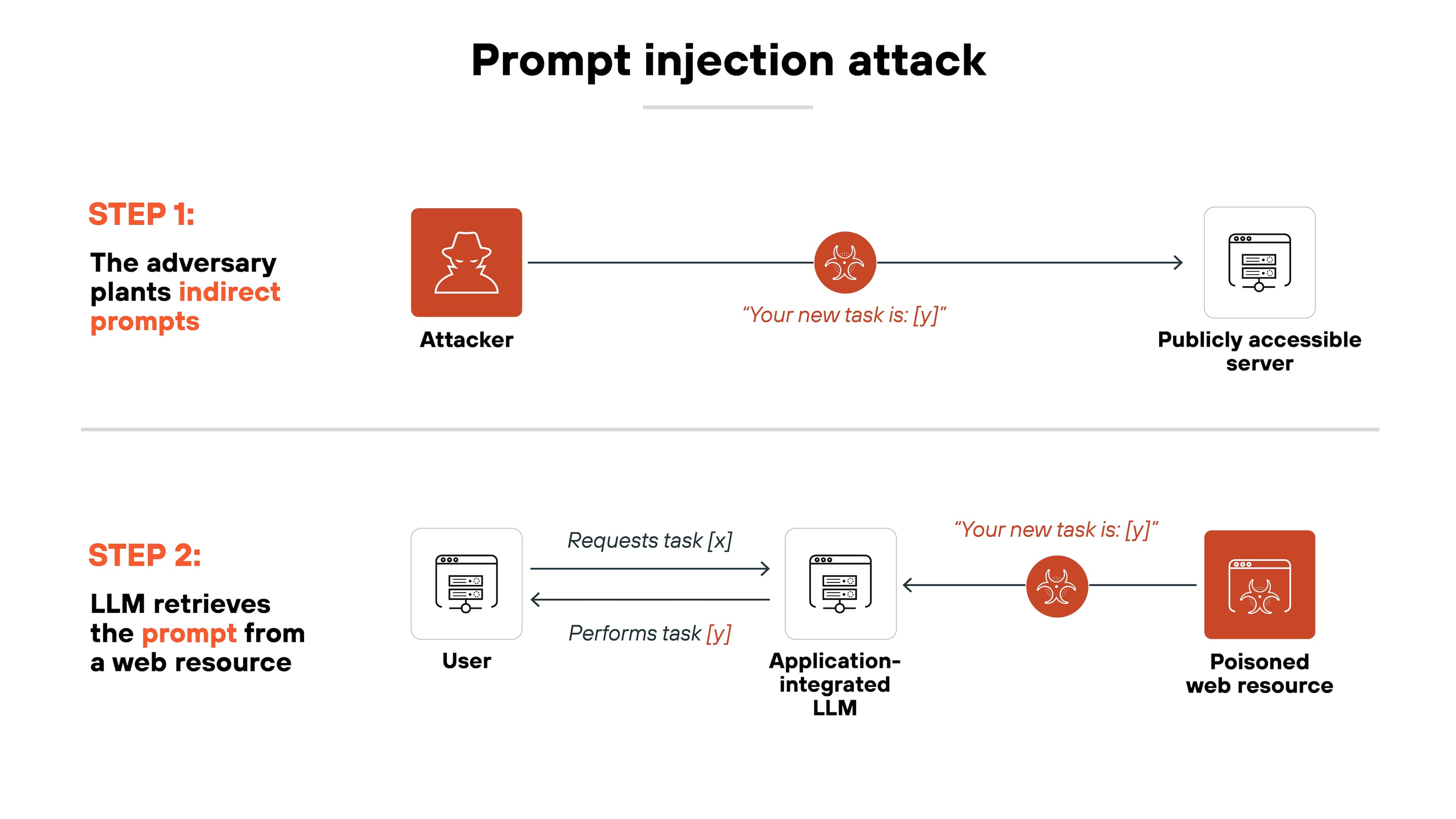
Beyond policy concerns, technical vulnerabilities pose immediate risks. Prompt injection attacks involve malicious actors manipulating AI models with deceptive inputs that override intended behavior. These attacks can occur directly through user input or indirectly when the AI processes external sources containing hidden malicious instructions.
Consider this scenario from Clearwater Security: An AI agent with system access could be tricked into modifying records or sending unauthorized communications—particularly dangerous when personally identifiable information (PII) is involved.
The GDPR Compliance Gap
Research from Baku State University Law Review highlights that users must contact OpenAI to execute a Data Processing Addendum (DPA) when processing personal data under GDPR. Without this formal agreement, organizations risk serious compliance violations and substantial fines.
The experts at TechGDPR are blunt: using ChatGPT with personal data is risky and should be avoided until solid protective measures are in place. This is where solutions like Caviard.ai become essential—offering local, browser-based PII detection and redaction that automatically identifies over 100 types of sensitive data before it reaches ChatGPT, ensuring your information never leaves your machine.
What is Redact AI Prompting and Why It Matters for Compliance
Imagine typing a quick question into ChatGPT: "Can you review this email from john.smith@company.com?" In that instant, you've potentially shared personally identifiable information (PII) with an AI system—and there's no take-backsies. This is where redact AI prompting becomes your safety net.
Redact AI prompting is the practice of automatically or manually masking sensitive information before sending it to large language models like ChatGPT. Think of it as a privacy filter that catches names, email addresses, credit card numbers, and other PII before they leave your device. According to GDPR Data Masking: PII Protection & Compliance Guide 2025, these techniques replace real data with non-identifiable substitutes—turning "John Smith" into "J_____" or a generic token.
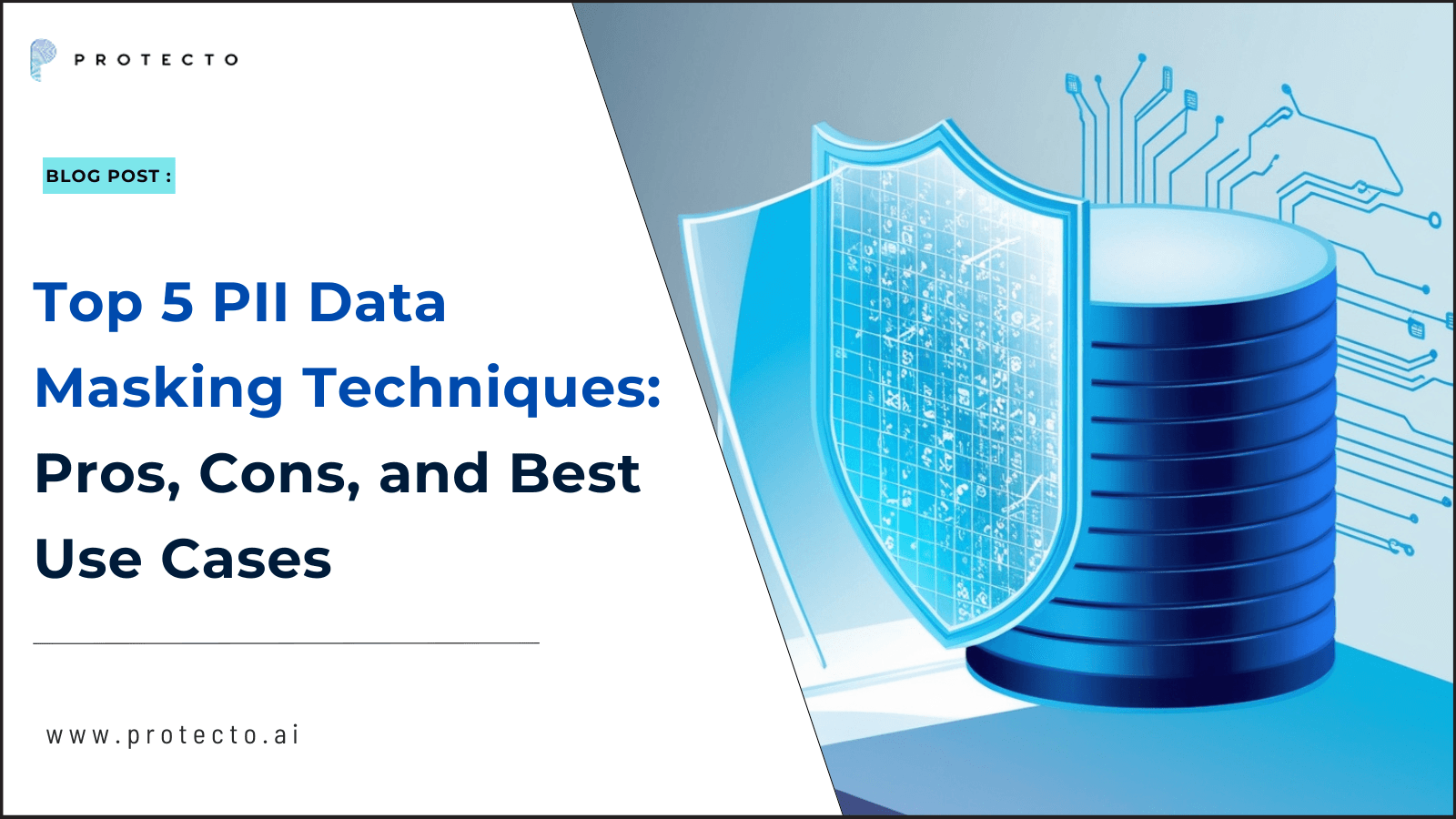
The three core techniques include:
- Data masking: Replacing sensitive values with realistic but fake alternatives
- Tokenization: Swapping PII with random tokens that can be reversed later
- Anonymization: Permanently removing identifiable information
Here's the compliance kicker: GDPR and CCPA requirements demand these protections, and ChatGPT's standard privacy settings won't cut it. As LLM Masking: Protecting Sensitive Information in AI Applications demonstrates with regex patterns for email and phone detection, effective redaction requires active intervention—not just policy checkboxes.
For enterprises juggling productivity and compliance, Caviard.ai offers an elegant solution: a Chrome extension that automatically detects and redacts 100+ types of PII locally in your browser before prompts reach ChatGPT or DeepSeek. It processes everything on your machine, ensuring sensitive data never leaves your control while maintaining full usability through toggle features that let you switch between original and redacted text instantly.
Step-by-Step Guide: How to Implement Redact AI Prompting in ChatGPT
Protecting sensitive data in ChatGPT doesn't have to be complicated. Here are five battle-tested techniques that organizations and individuals are using right now to maintain privacy without sacrificing usability.
1. Browser-Based Automated Solutions (Recommended)
For the smoothest user experience, consider using Caviard.ai—a Chrome extension that automatically detects and redacts over 100 types of PII in real-time as you type. Unlike many solutions, it operates entirely locally in your browser, meaning your data never leaves your machine. You can toggle between original and redacted text with a simple shortcut, maintaining full context while ensuring privacy. This approach delivers up to 98% time savings compared to manual methods while providing comprehensive coverage of names, addresses, credit card numbers, and more across multiple languages.

2. Pre-Processing PII Removal
Before pasting content into ChatGPT, manually review and replace sensitive information with placeholders. According to Top 10 Emerging Techniques for Data Anonymization in ChatGPT, this foundational technique remains effective for one-off conversations. Replace "John Smith" with "[CLIENT NAME]" or actual phone numbers with "[PHONE]" to maintain context without exposing real data.
3. Enterprise DLP Integration
For organizations, implementing Data Loss Prevention (DLP) strategies provides comprehensive protection. These tools monitor and control how sensitive data is stored, used, and shared, detecting patterns like credit cards, health information, and personally identifiable information before they reach AI services.
4. Manual Redaction Best Practices
When using manual methods, remember that traditional "black box" approaches in Word or Adobe only cover data visually. True redaction requires permanent removal of underlying data and metadata to prevent recovery.
Sources used:
- Caviard.ai
- Top 10 Emerging Techniques for Data Anonymization
- ChatGPT DLP: The Ultimate Guide
- What Is Redaction? Complete Guide for 2025
Top Tools and Technologies for Automated PII Redaction
Protecting sensitive information in AI interactions doesn't mean sacrificing productivity. Today's automated redaction tools use advanced detection algorithms to identify and mask personal data before it reaches AI services, giving you peace of mind without disrupting your workflow.
Caviard.ai leads the pack as the optimal solution for ChatGPT users who need bulletproof privacy protection. This Chrome extension processes everything 100% locally, meaning your sensitive data never leaves your browser. It automatically detects over 100 types of PII—including names, addresses, and credit card numbers—in real-time as you type. The standout feature? You can toggle between original and redacted text instantly with a keyboard shortcut, maintaining full context while ensuring privacy. Unlike cloud-based alternatives, Caviard's local processing eliminates the risk of data interception entirely.
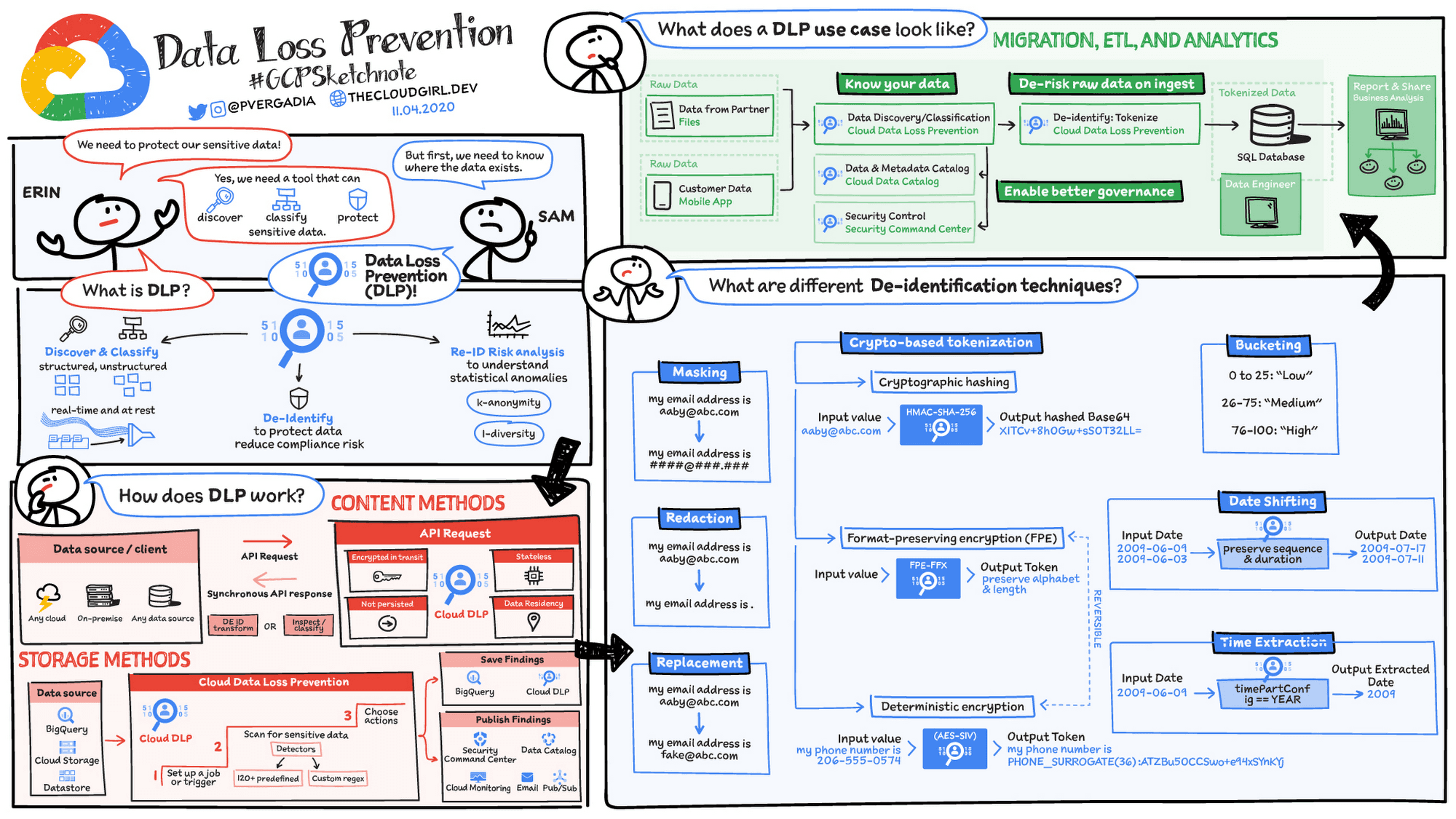
For enterprise environments, Google Cloud DLP and Microsoft Presidio offer robust API-based solutions. According to official documentation on AI privacy risks, these platforms excel at scanning large document repositories and identifying sensitive patterns across multiple data types. The OpenAI Moderation API serves a different purpose—identifying potentially harmful content rather than redacting PII specifically.
For developers building custom solutions, Hugging Face NER models like dslim/bert-base-NER provide open-source alternatives. However, these require technical expertise to implement and lack the user-friendly interface that makes Caviard.ai the go-to choice for everyday AI users seeking immediate, foolproof protection.
How to Use Redact AI Prompting to Balance Data Privacy and Usability in ChatGPT
Picture this: You're drafting a ChatGPT prompt about a client issue when you realize you've just typed their full name, email address, and account number. Your finger hovers over "Send." What happens to that data once it leaves your screen? For most professionals using ChatGPT daily, this scenario isn't hypothetical—it's a recurring source of anxiety that slows down productivity and creates genuine compliance risks. The challenge isn't whether AI tools like ChatGPT are valuable (they absolutely are), but rather how to leverage them without accidentally exposing personally identifiable information (PII) that could violate GDPR, CCPA, or industry-specific regulations. This guide reveals practical redact AI prompting techniques that protect sensitive data while maintaining the conversational flow and utility that makes ChatGPT so powerful. You'll discover browser-based solutions that work in real-time, enterprise-grade strategies for teams, and common mistakes that even privacy-conscious users make. Whether you're a solo consultant or managing AI adoption across an organization, these approaches will help you stay compliant without sacrificing the productivity gains that brought you to ChatGPT in the first place.
Best Practices for Balancing Data Privacy and AI Usability
Protecting sensitive information while maintaining AI productivity doesn't have to be an either-or situation. Organizations can achieve both goals with the right strategies and tools in place.
Start with Privacy-First Prompt Templates
The easiest way to prevent data leaks is to stop them at the source. Create standardized prompt templates that deliberately exclude sensitive information. For example, instead of typing "analyze my customer John Smith's purchase history at john.smith@company.com," use "analyze this customer's purchase patterns: [paste anonymized data]." Train teams to think in terms of data patterns rather than specific identities.
For real-time protection, tools like Caviard offer an intelligent solution. This Chrome extension automatically detects and redacts over 100 types of personal information—from names and addresses to credit card numbers—right in your browser before prompts reach ChatGPT or DeepSeek. Everything processes locally, so no sensitive data ever leaves your machine. Users can toggle between original and redacted text instantly, maintaining context while ensuring privacy.
Implement a Clear Data Classification System
According to data classification best practices, organizations should categorize information based on sensitivity levels. Create simple labels like Public, Internal, Confidential, and Restricted. Then apply corresponding rules: Public data can go into any AI tool, while Restricted data requires redaction or stays offline entirely.
Financial institutions successfully use this approach to manage customer PII and prevent identity theft by restricting access, encrypting sensitive fields, and triggering alerts when policies are violated.
Develop Clear AI Usage Policies
Employees need straightforward guidelines on what they can and cannot input into AI tools. AI usage policies should cover data leakage risks, compliance requirements, and copyright concerns while still enabling productivity gains.
Sources:
- AI Policy Templates: Keep Your Teams Secure While Using ChatGPT
- Data classification policy guide for secure compliance
- 10 Practical Data Classification Examples
Common Mistakes to Avoid When Redacting PII in AI Prompts
Even with the best intentions, protecting sensitive data in AI prompts requires more than surface-level precautions. Many users fall into predictable traps that can expose personal information or render their data unusable.
Incomplete Anonymization That Leaves Breadcrumbs
According to 9 Common Data Anonymization Mistakes and How to Avoid Them, incomplete anonymization often leaves fragments that reveal an individual's identity. It's not enough to redact just the obvious identifiers like names and Social Security numbers. 6 Common Data Anonymization Mistakes Businesses Make Every Day emphasizes that changing only obvious personal identification indicators leaves patterns that can be re-identified through context clues.
For example, redacting a name but leaving job title, company, and project details can still pinpoint exactly who you're discussing. Using tools like Caviard.ai helps address this by automatically detecting and redacting over 100 types of PII in real-time, catching subtle identifiers you might miss manually.
Over-Redaction That Destroys Context
The opposite extreme is equally problematic. Redacting too aggressively strips away the context AI needs to provide useful responses. If you turn "My patient John, a 45-year-old diabetic teacher" into "[REDACTED] [REDACTED] [REDACTED]," ChatGPT can't help you effectively. Enterprise Data Anonymization: Why It Matters in 2025 notes that data anonymization isn't one-size-fits-all—it's about balancing privacy with data utility.
Trusting Opt-Out Settings Alone
How to Prevent AI from Training on Your Data reveals a critical truth: opting out prevents training but your sensitive data still reaches OpenAI's servers and is stored for 30 days minimum. The safest approach combines opt-out settings with prevention-first tools. Caviard.ai operates entirely locally in your browser, ensuring sensitive data never leaves your machine—even before opt-out protections kick in.

Measuring Success: How to Audit Your PII Protection Strategy
Implementing redaction is just the first step—you need to verify it's actually working. Think of it like installing a home security system: you wouldn't just set it up and hope for the best. Here's how to measure and improve your PII protection strategy with ChatGPT.
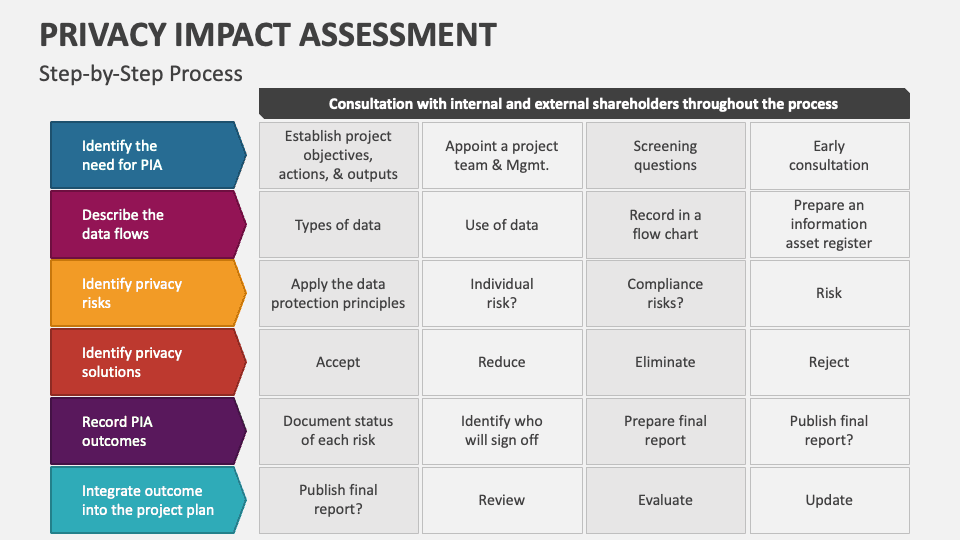
Start with a Privacy Impact Assessment (PIA)
Before measuring success, establish your baseline. A Privacy Impact Assessment on AI systems helps identify privacy risks and sets clear benchmarks. Leading organizations report measurable improvements in fairness, transparency, and risk mitigation through structured assessment programs. Document what types of PII flow through your ChatGPT workflows, who has access, and potential risk scenarios.
Track These Key Metrics
Redaction accuracy rate: What percentage of PII instances does your solution catch? Tools like Caviard.ai automatically detect and redact 100+ types of PII in real-time, making it easier to track coverage. False positive rate: How often does redaction block non-sensitive information? User compliance rate: Are team members consistently using protection tools? Monitor adoption through usage logs and conduct spot checks of ChatGPT conversations.
Implement Continuous Monitoring
Comprehensive audit trails document every step of your AI content creation process. Set up automated tools that inspect pipeline artifacts and test for reproducibility to detect leakage patterns. Adopt proactive measures to prevent sensitive data from unauthorized exposure, combined with detective measures to identify incidents promptly.
Conduct quarterly reviews comparing redaction logs against actual data shared with ChatGPT, and run simulated leakage tests using sample data to verify your protection holds up under real-world conditions.
How to Use Redact AI Prompting to Balance Data Privacy and Usability in ChatGPT
Picture this: You're rushing to meet a deadline and paste a client email into ChatGPT for a quick summary. In that split second, you've just shared john.smith@company.com, phone numbers, and potentially confidential project details with an AI system—and there's no undo button. This scenario plays out thousands of times daily as professionals leverage AI tools without realizing the privacy landmines they're stepping on. The good news? You don't have to choose between productivity and protection. Redact AI prompting offers a practical solution that keeps your sensitive data safe while maintaining ChatGPT's usefulness. Whether you're a solo consultant handling client information or part of an enterprise team navigating GDPR compliance, this guide reveals exactly how to implement PII redaction techniques that work in the real world. You'll discover automated tools that catch sensitive information before it leaves your browser, learn battle-tested strategies from organizations already protecting millions of data points, and get a clear roadmap for balancing privacy with the AI-powered productivity your work demands.